



Looking for Build a website with Elementor page builder?
There are many different ways to build a website. You can use a platform like WordPress, Squarespace, Wix or Weebly. Or you can code your own site from scratch.
But if you want an easy way to create a beautiful website without having to learn coding, then Elementor is the way to go. Elementor is a drag-and-drop website builder that makes it easy to create custom websites without having to touch a single line of code. With Elementor, you can design your site exactly how you want it, without being limited by pre-made templates or themes.
Plus, because Elementor is so easy to use, you can create a professional-looking website without the help of the frontend developers in just a few hours – even if you’ve never built a website before.
- Choose a domain name and web hosting provider.
- Install WordPress on your web server.
- Log in to your WordPress site and go to Elementor > Add New Section.
- Select the type of column layout you want to use for your website design.
- Drag and drop the widgets you want to use into the columns.
- Customize the look and feel of your website with Elementor’s live editing tools.
When you’re happy with your design, click the “Publish” button to make your website live!
👉 Can You Build a Website With Elementor Free?
Yes, you can build a website with Elementor free. However, there are some limitations to consider before using Elementor free. Elementor free is a great way to get started with building your own website.
However, there are some limitations to consider before using Elementor free. The biggest limitation is that you can only use a limited number of widgets and features in the free version. This means that if you want to use all the features and functionality of Elementor, you will need to upgrade to the pro version.
Another limitation of Elementor free is that it does not include support for eCommerce websites. If you want to build an online store, you will need to upgrade to the pro version which includes WooCommerce integration. Finally, while you can use Elementor free on an unlimited number of websites, each website will include a small “Made with Elementor” badge in the footer.
If you want to remove this badge, you will need to upgrade to the pro version. Overall, Elementor free is a great way to get started with building your own website. However, if you want access to all the features and functionality of Elementor, you will need to upgrade to the pro version.
👉 Is Elementor Good for Building Websites?
Elementor is a great platform for creating websites. It offers a wide range of features and options, making it easy to create beautiful and functional websites. One of the best things about Elementor is that it is very user-friendly, even for those who are not familiar with web design or coding.
👉 How Do I Create a Website Using an Elementor?
Assuming you would like a step-by-step guide on how to create a website using Elementor:
🗹 Choose your hosting provider and domain name. We recommend WordPress.com because it’s easy to use and has excellent support.
Once you’ve set up your account, come back to this tutorial.
🗹 Install the free Elementor page builder plugin. You can do this from your WordPress dashboard by going to Plugins > Add New.
Search for “Elementor” and install the plugin by pressing the “Install Now” button.
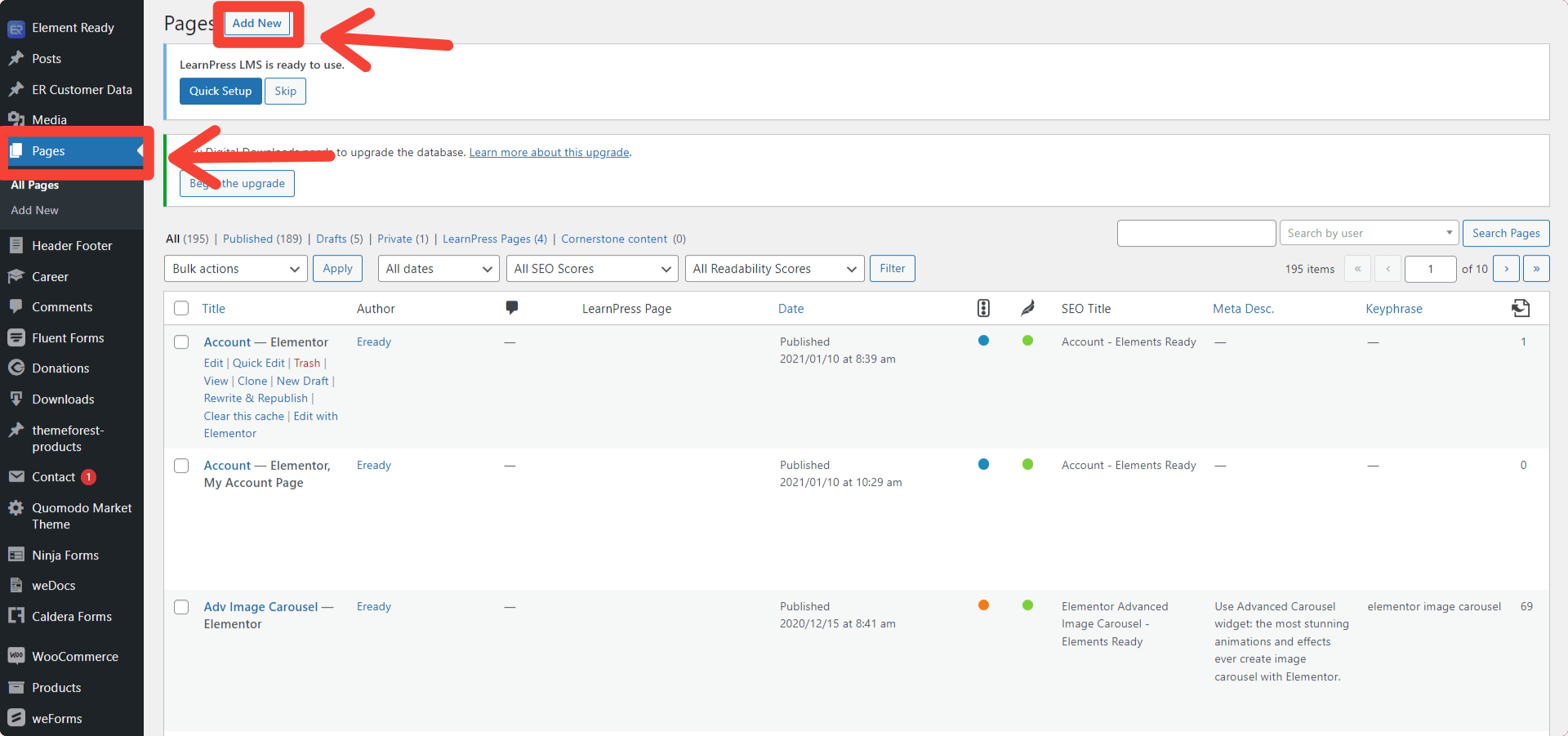
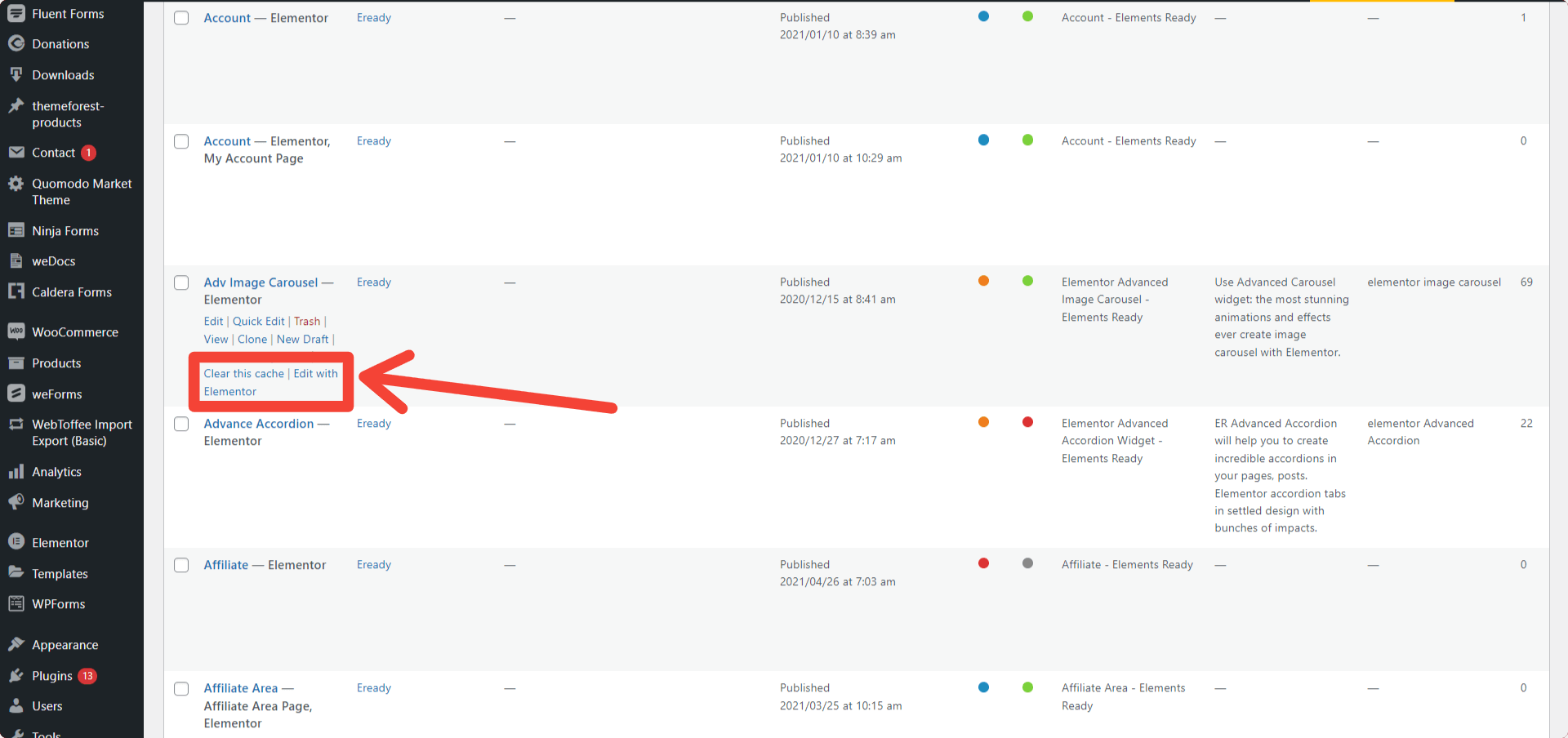
🗹 Create a new page or post in WordPress and click the “Edit with Elementor” button that appears above the content editor. This will launch the Elementor editor interface where you can begin building your web page or post layout using drag-and-drop elements.
🗹 To add an element to your layout, simply drag it from the left panel into your content area. For example, dragging over a heading element will insert a Heading block into your layout which you can then type out your headline text into.
🗹 Experiment with different elements and continue adding them until you have everything you need for your page or post layout completed.
Then save or publish your work when you’re finished editing!
👉 Adding Widgets and Elements
Adding widgets and elements is one of the most exciting and creative parts of building a website with Elementor. Widgets are pre-made content blocks that can be dragged and dropped onto web pages. They include everything from text and images to sliders and charts. Elements are more detailed blocks that you can customize with colors, fonts, and other settings. Both widgets and elements are incredibly useful for creating a professional, eye-catching website. There are components that are added to widgets, such as buttons, sliders, and checkboxes. To add widgets and elements, simply drag and drop them onto the Elementor editor. You can customize the look and feel of the widget or element by changing its color, size, border, and other properties. Once you’re finished, you can publish the changes or save them to review at another time.
👉 How Do I Use WordPress Elementor to Create a Website?
Assuming you would like a tutorial on how to use WordPress Elementor to create a website: Elementor is a popular WordPress plugin that allows users to create custom websites without having to write any code. It’s easy to use and comes with a wide range of features, making it a great choice for those who want to create a professional-looking website without any coding knowledge.
In this tutorial, we will show you how to use WordPress Elementor to create a custom website from scratch. We will also cover some of the most useful features that come with the plugin, so you can get the most out of it. Let’s get started!
installing WordPress and activating the theme of your choice. For this tutorial, we will be using the Twenty Seventeen theme which is available for free in the WordPress repository. Once you have installed WordPress and activated your theme, head over to Plugins » Add New page in your dashboard and search for “Elementor” in the plugins directory.
Install and activate the Elementor Page Builder plugin. After activation, you need to visit Elements -> Add New in your dashboard and click on the ‘Create Template’ button at the top left corner of the screen. This will take you to Elementor editor where you can start designing your custom template.
On the left-hand side of the screen, you will see various elements that you can add to your template. Simply drag and drop them into place. You can also edit their settings by clicking on icon next to the elements name or double-clicking on them.
👉 Elementor Website Builder
Elementor is a popular website builder that allows you to create custom websites without having to code. It is a drag-and-drop builder that makes it easy to create beautiful websites. You can add your own logo, images, and text, or you can choose from a variety of pre-made templates.
Elementor also offers a wide range of integrations, so you can add features like contact forms, social media buttons, and eCommerce functionality.
👉👉👉 On the other hand, there are so many third-party add-ons on the market. You will get so many new features on it. ElementsReady Elementor Addons is one of them. It has 100+ free & premium widgets with 850+ premade Elements.
👉 How to Edit WordPress Website With Elementor
If you’re looking to edit your WordPress website with Elementor, there are a few things you need to know. First, you need to make sure that you have the Elementor plugin installed and activated. Once you’ve done that, you can start editing your site right away.
To edit your pages with Elementor, simply click on the “Edit with Elementor” button that appears on each page. This will open up the Elementor editor, which will allow you to make changes to your page’s content and design. Elementor includes a wide range of features that will allow you to customize your pages however you like.
You can add new elements to your pages, such as text boxes, images, and videos; change the fonts and colors; and even add animations. Once you’re happy with your changes, simply click the “Publish” button to save them. And that’s it!
You’ve now successfully edited your WordPress website with Elementor.
👉 Website Design Elementor
Elementor is a website builder that enables you to create beautiful websites without having to code. It is easy to use and comes with a wide range of features that make it the perfect tool for creating any type of website. Whether you’re looking to create a simple blog or an intricate e-commerce site, Elementor has you covered.
With Elementor, you can create your website from scratch or use one of the many pre-designed templates. The templates are fully customizable, so you can change anything you want to create the perfect website for your business. You can also add your own CSS and HTML if you want to have even more control over your website’s design.
Elementor is constantly being updated with new features and improvements, so you can be sure that your website will always be up-to-date with the latest web standards. If you’re looking for a powerful yet easy-to-use website builder, then Elementor is the perfect choice for you.
👉 Elementor Website Templates

Elementor is a popular WordPress plugin that allows you to easily create custom websites without having to code. The plugin includes a library of pre-designed website templates that you can use to get started quickly. In this blog post, we’ll take a look at some of the best Elementor website templates available.
If you’re looking for a simple yet stylish template, check out Minimalist from Template Monster. This template features a clean and modern design with plenty of white space and minimal distractions. It’s perfect for businesses or personal websites that want to showcase their content in an elegant way.
For something a little more unique, take a look at Creative Portfolio from My Theme Shop. This template is perfect for creative professionals who want to showcase their work in a portfolio-style website. It includes several different portfolio layouts and comes with all the features you need to create an impressive online presence.
If you’re running an eCommerce store, then you’ll want to check out Shop Isle from ThemeIsle. This beautiful template comes with everything you need to create a professional online store, including product pages, shopping cart integration, and more. You can also find plenty of other eCommerce-specific Elementor templates if Shop Isle doesn’t quite fit your needs.
No matter what kind of website you’re looking to create, chances are there’s an Elementor template that will suit your needs perfectly. With so many great options available, it’s easy to find the perfect starting point for your next project!
👉 Elementor Website Examples
Elementor is a powerful WordPress plugin that allows you to create amazing websites without having to code. With Elementor, you can easily drag and drop elements to create beautiful pages. In this post, we’ll show you some stunning Elementor website examples that will inspire you to create your own website with this powerful plugin.
If you’re looking for a way to create a beautiful website without having to learn coding, then Elementor is the perfect solution for you. With its easy-to-use drag and drop interface, anyone can create a professional-looking website in no time. To give you some inspiration, we’ve gathered some of the best Elementor website examples below.
From personal blogs to corporate websites, there’s an example here for everyone.
🗸 Hello Beautiful: This personal blog uses Elementor’s free version to great effect.
The author has made use of the available widgets and templates to create a visually appealing site that is easy to navigate.
🗸 Homely Planet: This environmental blog shows how Elementor can be used to build a simple but effective website.
The use of white space and clean fonts makes the content easy to read, while the photos add visual interest.
🗸 Designmodo: Designmodo is a popular design blog that uses Elementor Pro to build their site. The result is a sleek and stylish site that looks like it was created by a professional designer (which it was!).
👉 Elementor Free
Elementor is the best WordPress page builder you can find. It’s free, easy to use and comes with all the features you need to create beautiful pages for your website.
🧐 Conclusion
Using Elementor to build a website is an easy and affordable way to launch your website and make it look amazing. The user-friendly interface, drag-and-drop feature, and wide range of customization options make it a great choice for both beginners and experienced web designers. Plus, the Elementor Pro version allows you to take your website to the next level with advanced features such as WooCommerce integration, custom forms, and more. With Elementor, you can easily create a website that looks professional and functions perfectly. Page builder includes a library of free and premium templates that you can use to quickly and easily create stunning website designs. With Elementor, you can create a website in no time and make it look unique and professional. Plus, there are plenty of free and premium Elementor add-ons available to add extra features and functionality to your website.
